Your Beauty Profile: what VIPAD knows about you, and who decides
What the VIPAD Beauty Profile holds, how you choose which results become part of it, how Beauty AI uses only what you approved, and how to correct or delete it.
4 min read



Personal advice is only as good as what it is based on. A friend who knows that your skin is dry, that fragrance bothers you and that you have ten minutes in the morning gives better advice than a stranger with a list of trending products. The Beauty Profile is where VIPAD keeps that kind of knowledge, and you decide what goes in it.
What the Beauty Profile holds
The profile is split into six sections. Every field is optional, and a small completeness line shows how many sections you have filled in.
- About you: your name and, if you like, a photo.
- Skin: skin type, skin concerns and how sensitive your skin is.
- Hair: hair type, hair color and hair concerns.
- Face: face shape and eye color.
- Preferences: the brands you like and your budget.
- Sensitivities: the ingredients you want to avoid.
A separate Preferences screen lets you go further: brands to avoid, fragrance free or light fragrance, how much time you have for a routine, natural or defined makeup, and colors you like or avoid. Products with an ingredient on your avoid list, and brands on your avoid list, are never recommended.
Let VIPAD get to know you
Build your Beauty Profile and ask Beauty AI questions it answers from what you approved.
Two ways in: what you type and what you approve
The first way is simple. You type or tap what you already know about yourself. The second way comes from your analyses, and this is where the profile works differently from a form that fills itself in behind your back.
When a Beauty Tool finds something that can describe you, VIPAD asks first: Add to your Beauty Profile? You see what the result found and add only what fits you, or tap Not now. Nothing is added unless you tap the button.
- From Face and Feature Analysis: face shape, eye shape, brow shape and lip shape.
- From Personal Color Analysis: your color temperature, warm, cool or neutral.
- From Fitzpatrick Type: your place on the six point sun response scale.
- From Skin Analysis: your latest reading, and the areas to care for if you add them as skin concerns.
- Also possible: your skin type and your style preference.
Each item shows where it came from, the tool and the date. If you would rather not be asked every time, you can let future eligible results be added automatically, and you can still remove any of them later.
How Beauty AI uses your profile
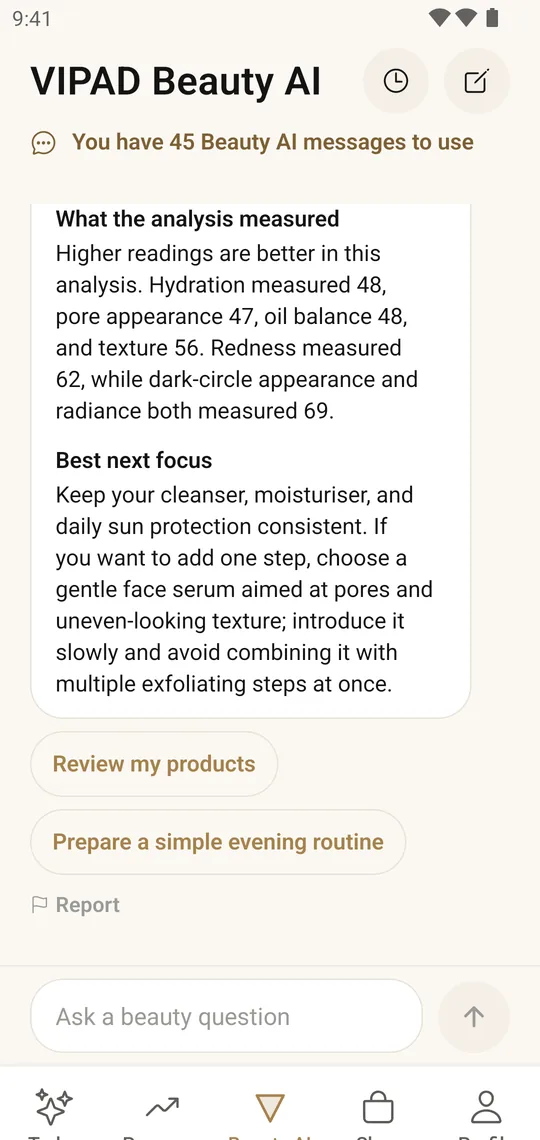
Beauty AI, your personal esthetician inside the app, reads this profile before it answers, together with the results you approved, the products in My Products, your routines and your goals. If a detail it needs is not there, it says so and asks you a short question.
Answers about you
Beauty AI explains a result with your own readings and suggests what to focus on first.
That is why the same question gets a different answer for different people. Ask which moisturizer to try, and the answer can respect your skin type, the ingredients you avoid and your budget. Ask how to improve your routine, and it starts from the products you already own.
The VIPAD Store and your plans read the same profile. That is why a product can carry a For you label with a short note on why it was suggested, and you can judge that reason yourself.
Correcting what is wrong
People change. Hair grows out, a new color goes on, skin behaves differently in winter. Open any section and edit it whenever something is no longer true. Your Beauty History notes when you corrected your profile, so you can see what changed and when.
An item added from an analysis can be removed with one tap. If you delete the result an item came from, the item is no longer used. Your profile never holds on to a reading you threw away.
Private by design
- Only you can see your photos and results.
- A photo is used only to create its result, never for advertising, and your beauty data is never shared with advertisers.
- Results stay in your Beauty History for 365 days unless you delete them sooner, and deleting a result also deletes the photo kept with it.
- You can delete a Beauty AI conversation at any time.
- Deleting your account erases your profile, photos, routines and history.
What is worth knowing about yourself
Even without any app, a few facts make every beauty decision easier. These are the ones that change advice the most, and the ones worth putting in your profile first.
- How your skin feels by midday: tight, comfortable or shiny tells you more about your skin type than a label on a jar.
- Anything that has irritated you before: write down the product and, if you can, the ingredient.
- Your real budget per product, not the ideal one.
- How much time you truly have in the morning and in the evening.
- What has worked: a product you finished and would buy again is useful information.
Start with one section that matters to you today. The profile does not need to be complete to be useful, and every detail you add makes the next answer a little more yours.
Let VIPAD get to know you
Build your Beauty Profile and ask Beauty AI questions it answers from what you approved.